

Vendor list
Where: Vendors › Vendors
Vendors are the linguists and suppliers who deliver your work. The list holds their contact details and shows whether each one has accepted an invitation to your workspace.
The vendor list. Rows showing Invite in the Vendor column have not yet been invited to join.
Adding a vendor
Section titled “Adding a vendor”- Go to Vendors and select Add Vendors.
- Enter the first name. Required.
- Enter the last name. Optional, but worth completing - it is what appears on purchase orders.
- Enter the email address. Required, and it must be one the linguist can access: it is both their login and where task offers are sent.
- Select Submit. The vendor receives an
ABRID and appears in the list.
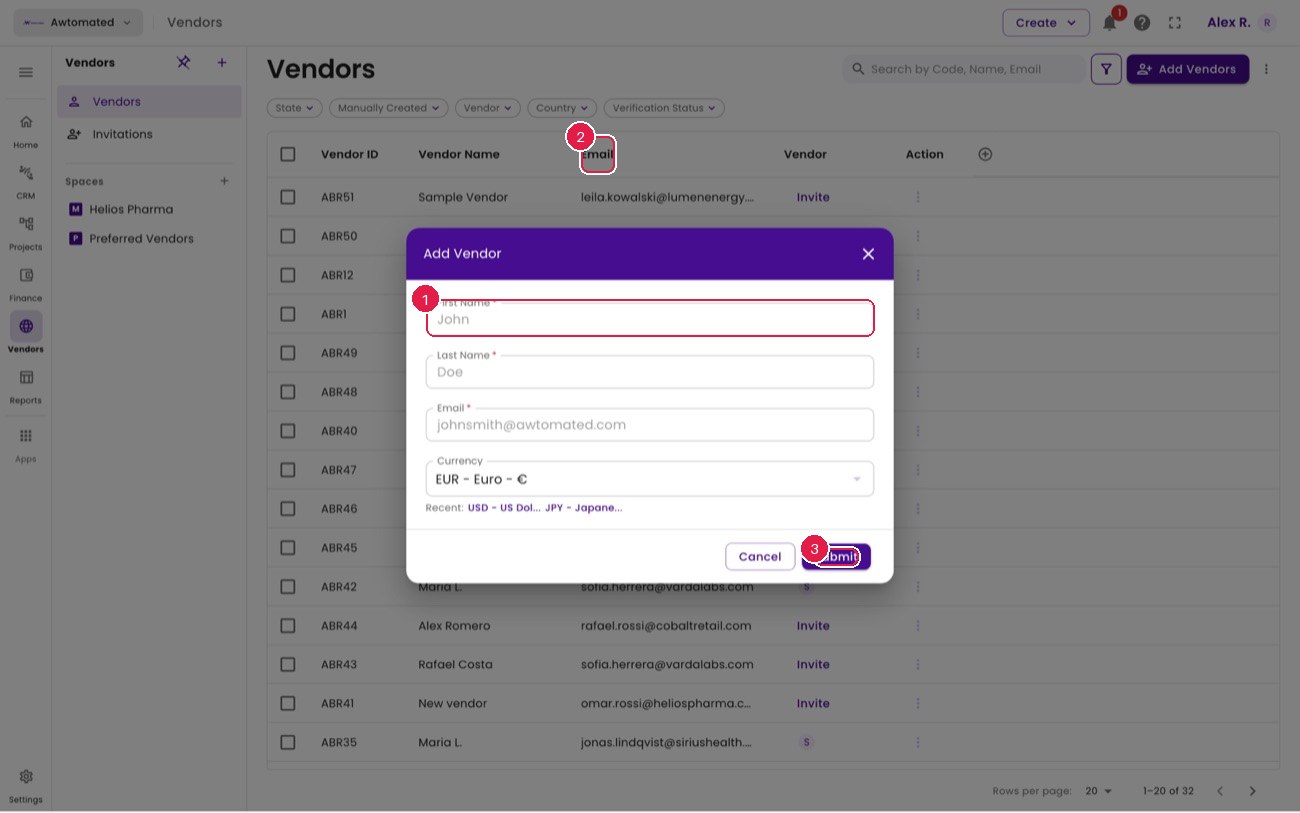
Adding a vendor records them in your database. Inviting them is a separate step.
- First name (required)
- Email (their login)
- Submit
Related: The vendor record & rates · Invitations · The vendor portal